
Find, Download and Check Your Compass Wage Statement
Compass Group associates can use approved employee portals to access available W-2 wage and tax statements. The correct route depends on whether you use the Compass Associate Portal, ESS Mobility or an OMS-connected account.
This guide covers current and former associates, missing forms, incorrect information, password problems, safe downloading and the official support route for W-2 questions.
Quick answer
Hourly associates without OMS or a Compass Network ID can normally access available W-2 forms through the Compass Associate Portal. Associates can also use ESS Mobility on a smartphone or tablet. Managers and hourly administrators with OMS access generally use their OMS credentials.
Look for a menu labeled W-2, W2s, Tax Forms, Payroll or a similar tax-document option. Portal wording can change, so do not assume that W-2 access is always inside PeopleHub.
What to Know Before Opening the Portal
A W-2 is the annual wage and tax statement an employer provides to an employee. It reports taxable wages, federal and state withholding, Social Security wages, Medicare wages and other payroll information needed for tax filing.
Your W-2 is different from a pay stub. A pay stub explains one pay period, while a W-2 summarizes reportable amounts for the calendar year.
Prepare these details
- Your Compass personnel number or assigned username
- Your CAP, ESS or OMS password
- The tax year you need
- Access to your registered email or recovery method
- A trusted phone, tablet or computer
Use a safe device
- Avoid public library or hotel computers
- Update the browser before downloading
- Use a private internet connection when possible
- Check that the address belongs to Compass
- Log out after saving the document
Choose the Correct Compass W-2 Access Route
Using the wrong employee system can cause unnecessary password resets and account-lock messages. Start with the route that matches your work account.
| Your situation | Recommended system | Credentials | What to look for |
|---|---|---|---|
| Hourly or frontline associate without OMS access | Compass Associate Portal | CAP personnel number and password | W-2, W2s, Paystubs or tax-document area |
| Associate using a phone or tablet | ESS Mobility | CAP credentials for hourly users without OMS | More, Payroll, W-2 or tax-document option |
| Manager or hourly administrator with OMS | OMS or ESS Mobility | Assigned OMS credentials | Personal payroll or W-2 area |
| New associate without a CAP account | CAP registration | Account created after employment verification | Register link below the login area |
| Former associate whose portal access no longer works | Compass One HR | Portal access may no longer be available | Call 877-311-4747 and select option 2 |
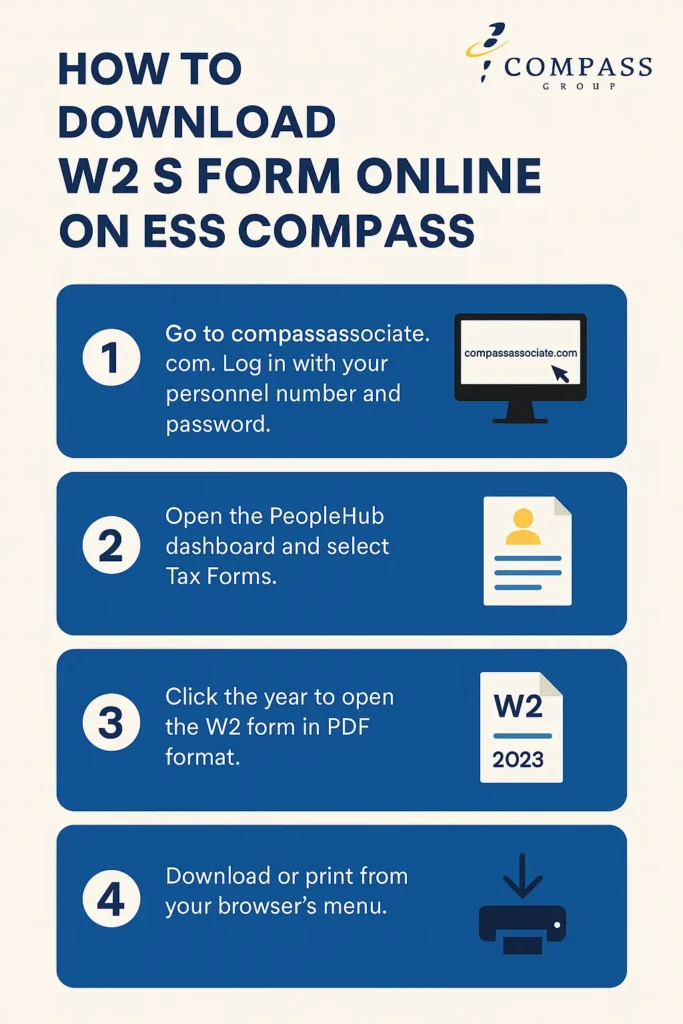
How to Download Your W-2 Through CAP
Open the official CAP website
Type compassassociate.com directly into your browser or use a bookmark you previously verified.
Sign in with your CAP account
For many hourly associates, the username is the personnel number and the password is the one created during CAP account setup.
Locate the wage-statement area
Look across the dashboard and payroll menus for W-2, W2s, Tax Forms, Paystubs or a similarly named option.
Select the correct tax year
The year shown on a W-2 is the year in which the wages were paid. A W-2 labeled 2025 is generally used when preparing a 2025 income-tax return filed during 2026.
Open and verify the statement
Before filing, confirm that your name, identifying information, employer details, wages and withholding appear reasonable.
Download or print securely
Use the portal or browser download control. Save the PDF in a protected folder and use a private printer when a paper copy is needed.
How to Access a W-2 Through ESS Mobility
ESS Mobility is useful when you do not have immediate access to a desktop computer. It runs through a supported smartphone or tablet browser and requires JavaScript.
- Open ess.compassassociate.com in your mobile browser.
- Use CAP credentials if you are an hourly associate without OMS access.
- Use OMS credentials if your manager or administrator account is connected to OMS.
- Open More, Payroll or the available employee-document menu.
- Choose the W-2 or tax-document option shown in your account.
- Select the correct year.
- Open the document and use Save to Files, Download or Print.
- Log out when finished.
Mobile PDF will not open
How Former Compass Employees Can Request a W-2
Leaving the company does not remove the employer’s obligation to provide the applicable wage statement, but your employee-portal access may change after separation.
Start with any account that still works
- Try your existing CAP login without creating a duplicate account.
- Check your saved email for prior CAP registration or password-reset messages.
- Use the official Forgot Password or Reset Account function when available.
- Check the W-2 tax year carefully after entering the portal.
When portal access has ended
- Call Compass One HR at 877-311-4747.
- Select option 2 for W-2 and payroll support.
- Explain that you are a former associate.
- Provide your employment dates, former location and personnel number when requested.
- Confirm the mailing address or approved delivery method.
Prepare this information before contacting payroll
For privacy, payroll may need to verify your identity before discussing or reissuing a wage statement. Use only the verification method provided through an official Compass channel.
What to Do When Your Compass W-2 Is Missing
A missing W-2 does not always mean the employer failed to create one. The document may be in another portal, assigned to a different tax year, mailed to an old address or delayed by an account-access problem.
Check the year and portal
Verify that you selected the wage year, not the year in which you are currently filing. Check CAP and ESS Mobility where available.
Check your mailing information
Consider whether you moved or changed your address after leaving Compass. A printed statement may have gone to the last address in the payroll record.
Contact Compass payroll support
Call One HR at 877-311-4747 and select option 2. Ask whether the statement was issued and how an approved copy can be obtained.
Escalate after the end of February when necessary
If you contacted the employer and still did not receive the form by the end of February, the IRS advises calling 800-829-1040.
Ask about Form 4852 when filing cannot wait
Form 4852 is an IRS substitute that may be used when an employer does not provide a W-2 or corrected W-2 in time. It requires wage and withholding estimates, often based on final pay records.
What to Do When Your W-2 Is Incorrect
Do not edit the PDF or manually change a number before filing. A correction normally needs to come from the employer so that the employee, Social Security Administration and tax authorities have consistent records.
Common errors to report
- Compare the W-2 with your final pay stub and personal records.
- Write down the exact box and amount that appears incorrect.
- Contact Compass One HR at 877-311-4747, option 2.
- Ask whether payroll will issue a corrected statement.
- Retain both the original form and any corrected form.
- Use the corrected information when preparing or amending a tax return.
If the employer has not corrected a significant error by the end of February, IRS guidance allows the employee to call 800-829-1040 or seek help through an IRS Taxpayer Assistance Center.
How to Read the Main W-2 Boxes
The figures in Boxes 1, 3 and 5 are not always identical. Certain pre-tax benefits can reduce federal taxable wages without reducing Social Security or Medicare wages in the same way.
| W-2 area | What it generally reports | What to review |
|---|---|---|
| Box 1 | Federal taxable wages, tips and other compensation | Compare with annual payroll records after eligible pre-tax adjustments |
| Box 2 | Federal income tax withheld | Check against year-to-date federal withholding on your final pay stub |
| Boxes 3 and 4 | Social Security wages and Social Security tax withheld | These amounts may differ from Box 1 |
| Boxes 5 and 6 | Medicare wages and Medicare tax withheld | Medicare wages can be higher than federal taxable wages |
| Boxes 7 and 8 | Social Security tips and allocated tips when applicable | Relevant to associates who received or were allocated reportable tips |
| Box 10 | Dependent-care benefits when applicable | Compare with benefits records |
| Box 12 | Coded items such as retirement contributions and other benefits | Read each letter code separately; not every amount is additional taxable income |
| Box 13 | Checkboxes for statutory employee, retirement plan or third-party sick pay | Confirm the boxes match your employment and benefits situation |
| Box 14 | Employer-specific or informational payroll items | Labels vary, so check payroll or tax instructions when unfamiliar |
| Boxes 15–20 | State and local employer, wages and withholding information | Important when you worked or lived in more than one state or locality |
W-2 Insider Tips That Prevent Common Problems
W-2 Login and Download Troubleshooting
| Problem | Possible cause | Recommended action |
|---|---|---|
| Password is rejected | Typing error, old saved password or wrong account type | Enter it manually, verify the portal and use official password recovery |
| Personnel number is not recognized | Account was not registered, number is incorrect or employment status changed | Check prior payroll records and contact a manager or One HR |
| Old email prevents password reset | CAP recovery information is outdated | Use Reset Account when available or request official account help |
| W-2 menu is missing | Wrong portal, different role layout or document not available in that view | Try CAP on desktop, check ESS Mobility and contact payroll if still missing |
| Only an older tax year appears | Wrong menu, new statement not loaded or incorrect account record | Refresh the session, confirm the wage year and call One HR option 2 |
| PDF opens as a blank page | Blocked pop-up, JavaScript issue or browser viewer problem | Try a private tab, allow the document and use another updated browser |
| Downloaded file cannot be found | Saved to a default Downloads or Files folder | Check recent browser downloads and immediately move it to a protected folder |
| Former employee account is locked | Employee-system access changed after separation | Stop repeated login attempts and call One HR option 2 |
Official Compass W-2 and Technical Support
| Support channel | Use it for | Contact |
|---|---|---|
| Compass One HR — Payroll | W-2, tax withholding, associate payment, pay card, garnishment and MySTAFF payroll questions | 877-311-4747, option 2 |
| Compass Technology Service Center | Compass technology-system assistance after normal browser troubleshooting fails | 888-295-7206 |
| Local manager or HR | Personnel-number confirmation, local employment records and account-routing questions | Use the verified contact supplied by your workplace |
| IRS individual assistance | Missing or incorrect W-2 after contacting the employer and following IRS timing guidance | 800-829-1040 |
Protect Your W-2 from Identity Theft
- Use only a verified Compass-controlled login address.
- Never send your portal password or one-time code to another person.
- Avoid ordinary email when transmitting a complete W-2.
- Do not upload the document to an unknown PDF-editing website.
- Store it in an encrypted or password-protected location.
- Remove printed copies from shared printers immediately.
- Delete the file from a borrowed device after securely transferring it.
- Do not publish a screenshot showing your name, address, wages or Social Security number.
Related ESS Compass Employee Guides
Compass Group W-2 FAQs
Where can I download my Compass Group W-2?
Is my Compass W-2 located inside PeopleHub?
Which W-2 do I need when filing taxes in 2026?
Can former Compass employees get their W-2 online?
Who do I call for a missing Compass W-2?
What should I do if my W-2 has the wrong wage or tax amount?
What is a W-2c?
What can I do if Compass still has not provided my W-2?
Can I use my last pay stub instead of a W-2?
Why does Box 1 not match Social Security or Medicare wages?
Is ess-compass.associates/ an official Compass payroll website?
Official Sources Used for This Guide
Important access, support and tax-procedure statements were checked against the following materials:
Editorial and Accuracy Notice
This article was substantially rewritten to replace an overly simplified W-2 pathway with separate guidance for CAP, ESS Mobility, OMS users, current associates and former associates.
We removed the unsupported assumption that every employee must open PeopleHub and select Tax Forms. Available Compass guidance identifies CAP and ESS Mobility as employee W-2 access channels, while current official Compass support information routes W-2 questions to One HR payroll support.
Missing-form, correction and substitute-form information was reviewed against current IRS materials. Portal screens, login requirements, department routing and tax rules can change, so the official employer portal, Compass payroll team and IRS instructions remain controlling.
Our editorial team does not access employee accounts and does not accept payroll documents for review. Readers should never submit a W-2, password, Social Security number, personnel number or security code through this website.
Last reviewed and updated: July 15, 2026
1 thought on “How to Access and Download Your W2 Form in ESS Compass?”