Your W2 form is one of the most important documents you will need during tax season. It shows your total earnings, federal and state taxes withheld, and other deductions for the year.
Compass Group makes it easy for employees to access their W2s online through the ESS Compass or Compass Associate Portal (CAP). so you can download it anytime, anywhere.
Read carefully Step by step guide below , how you can find and download your W2 form.
1. Go to the Compass Associate Portal
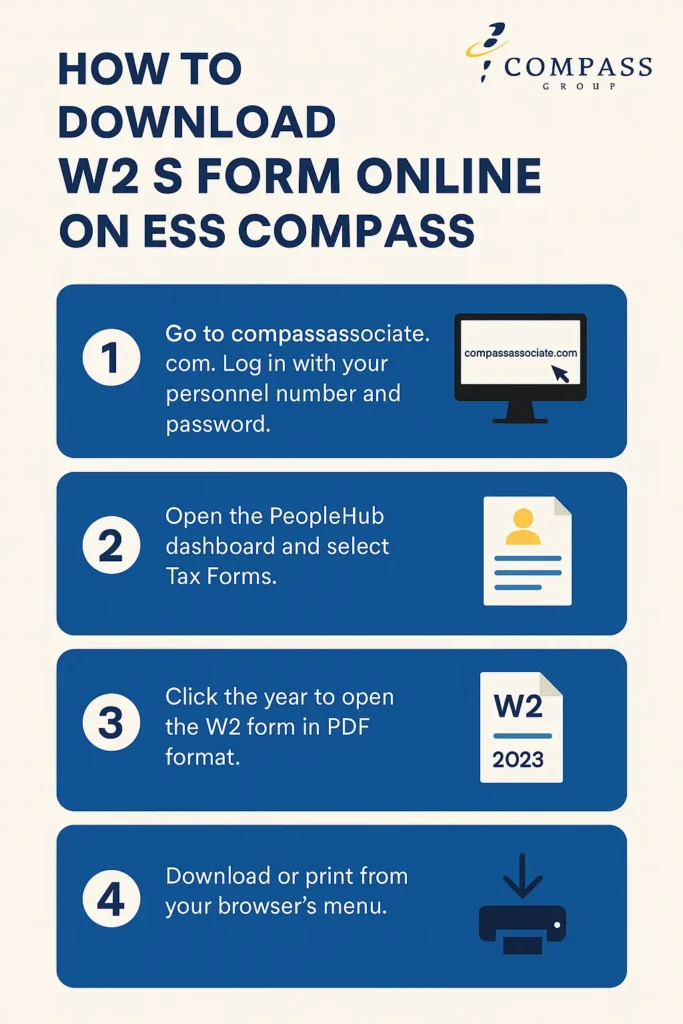
- Open your browser and visit compassassociate.com.
- Log in using your personnel number (username) and password.
- If you use a mobile device, you can also log in at ess.compassassociate.com.
💡 Tip: Bookmark these pages to avoid typing the address every time. Only use the official links to prevent login issues or phishing risks.
2. Open the PeopleHub Dashboard
- Once you log in, click on PeopleHub from your home screen.
- You will see several options like My Info, Payroll, Paystubs, and Tax Forms.
- Select Tax Forms to open your W2 section.
3. Choose the Tax Year You Want
- You’ll find a list of available W2 forms, usually for the past three years.
- Click on the year you want to view (for example, 2023).
- Your W2 will open in a PDF format showing your total earnings and deductions for that year.
4. Download or Print Your W2 Form
- Once the W2 file opens, look for the Download or Print option.
- You can save the file to your computer or phone, or print a hard copy for your records.
- Compass recommends keeping a backup in a safe folder labeled “W2 Forms.”
5. If You Do Not Have a Compass Network ID
No problem — employees without a company network ID can still view and download their W2 through the ESS Mobility portal.
- Visit ess.compassassociate.com.
- Log in using your personnel number and password.
- Tap Tax Forms to open and download your W2 PDF.
This option works well for field associates and part-time employees who do not use Compass computers.
6.When W2 Forms Become Available
- W2 forms are usually uploaded to ESS in January for the previous calendar year.
- You will get a notification email when your new W2 is ready.
- If you prefer a printed copy, you can still request one from your HR department.
Troubleshooting Tips
If you cannot find or open your W2, try these steps:
- Check that you selected the correct tax year.
- Make sure pop-ups are allowed in your browser.
- Update your Adobe PDF Reader or open it in a new browser window.
- If your account is locked, use the Forgot Password link or contact HR.
8.For HR or Payroll Support
If you need help, reach out to the Compass One HR Service Center:
📞 1-877-311-HRHR (4747)
🕗 Monday to Friday, 8:00 AM to 8:00 PM (Eastern Time)
They can help you reset your login, resend a W2 copy, or verify employment details.
Keep Your W2 Secure
Your W2 contains sensitive tax and personal data, so treat it like a confidential document.
- Always download it only from official Compass portals.
- Avoid sharing it by email unless required by verified authorities.
- Store your digital copy in a password-protected folder or secure cloud drive.
Verification Note
All steps above are confirmed from the Compass Associate Guide (CAP and ESS Portal, Revised October 2021) and verified Compass HR resources. The process may vary slightly by country, but for US associates, this method is accurate and official.